Fukurou web browser

Fukurou is a Mozilla Firefox (version 45.43.0 ESR) web browser fork, based on TenFourFox and AquaFox. It’s built for the PowerPC architecture and Mac OS X 10.5 platform supported (which means it will only work on G4 7450 and G5 CPUs running Mac OS X 10.5 Leopard), limiting hardware that it can work on to Apple iBook G4, PowerBook G4, Power Mac G4, Power Mac G4 Cube, iMac G5 and Power Mac G5. It’s not a browser for everybody due to the fact that its main goal is to provide a stable text and image browsing, while disabling every feature that will slow it down (basically video support).
Fukurou attempts to maintain a balance between privacy and security, providing ways to spoof the browser’s footprint as to not give away the fact that you’re running a severely-outdated web browser. It’s not a tool for security-freaks, because it doesn’t disable older versions of TLS for compatibility reasons (but they can be disabled by changing the security.tls.version.min key in about:config to 3, which will disable TLS 1.0 and 1.1, leaving only support for TLS 1.2 and 1.3 enabled). It does have the latest certificates from Firefox ESR128.
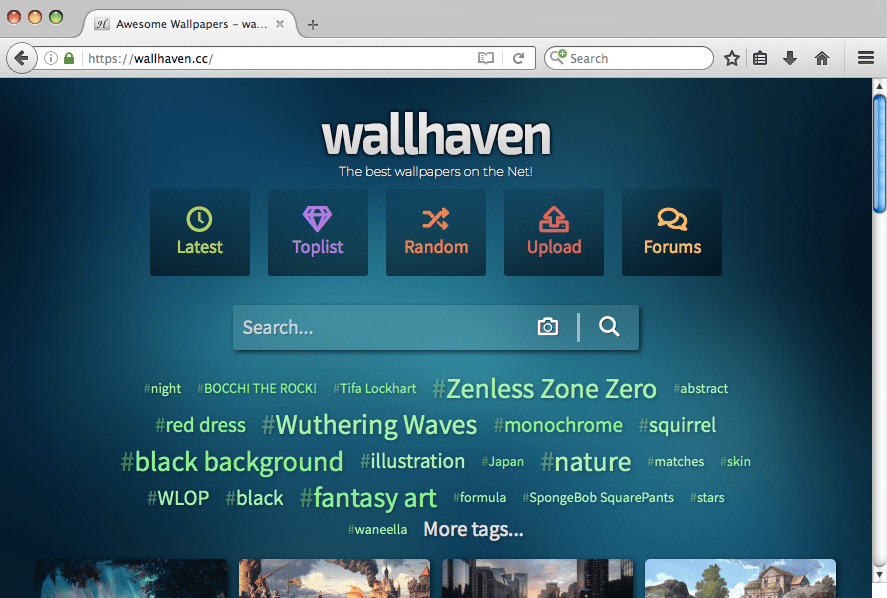
If you’re concerned about Fukurou exposing too much information about your system, you can always disable Javascript. As for which websites do not work on Fukurou, I don’t browse mainstream websites or have accounts on them, but I can tell you that Youtube, TikTok and the likes will not work because video support is disabled. If a website is behind Cloudflare, depending on the settings the website owner enabled in his Cloudflare settings, the website might be browseable. Or not. Cloudflare is cancer anyway.
Banking websites might not work either, depending on the amount of feature-sniffing they do, but you shouldn’t use such an old web browser to login into your bank account.
Because of the changes I did, Fukurou should load in less than 5 seconds (7-9 seconds with uBlock enabled because it will have to parse some million-line filters while starting up) and provide access to 80-90% of the Internet websites currently available. Testing system is an Apple iBook G4 with a 1.2GHz CPU and 1.256GB of RAM, incidentally it’s the same system I’m compiling Fukurou on (a full build takes 13 hours, but that’s another story).
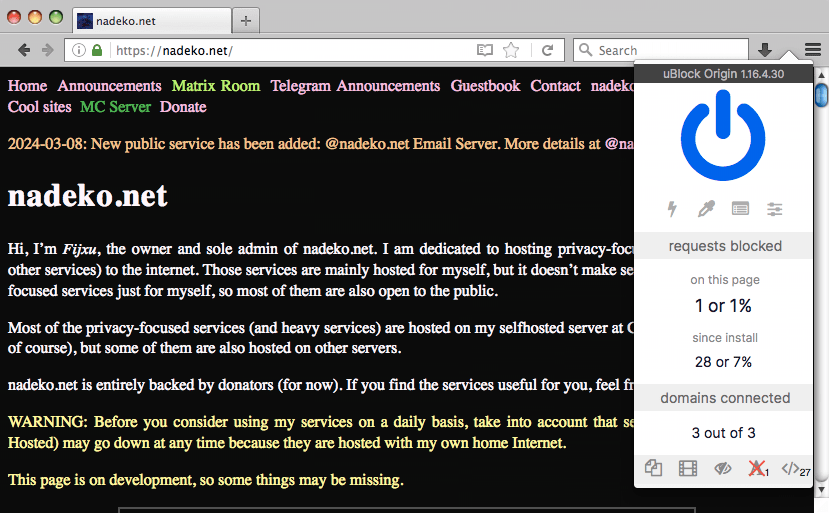
After drag-and-dropping Fukurou.app into your Applications folder, install uBlock Origin 1.16.4.30 (last version working), and if you’re a fan of the old Firefox-look install Classic Theme Restorer 1.6.9.1.
If you want to test what kind of data gets exposed by your web browser, use BrowserLeaks, DNS leak test and Cover Your Tracks. With Javascript disabled, the data leak should be minimal.
Extensions
- uBlock Origin version 1.16.4.30.
- Classic Theme Restorer version 1.6.9.1. Check out the screenshots below for the difference. Note: Classic Theme Restorer doesn’t provide any speed benefits (neither positive nor negative), it’s just something I use because the default theme has too much whitespace and it’s not well organized.
- For Gopher support, install the Overbite extension, version 3.1.1696.
Improvements
- disabled geolocation API, beacon, form fill, search suggestions, sensors API, battery API, contextmenu altering, clipboard events, gamepad and vibrator events, Firefox Accounts, media autoplay, EME, prefetch, PDF preview in browser, OCSP ping, telemetry, WebGL, web notifications, WebRTC.
- enabled First Party Isolation, CPU and platform spoofing, user agent spoofing.
- disabled all sorts of video and audio formats, which makes Fukurou unable to play any video and audio content.
- autostart with Private Browsing by default.
- removed the old Search Engines supported (Google, Yahoo, Bing) and added Brave Search (which is the default search engine), Yandex, DuckDuckGo, StartPage.
- GIF animations are disabled, only frame 1 is visible.
- default user agent should be
Mozilla/5.0 (Macintosh; Intel Mac OS X 10_15_7) AppleWebKit/537.36 (KHTML, like Gecko) Chrome/131.0.0.0 Safari/537.36, platformMacInteland oscpuIntel Mac OS X 10.15, which basically informs any website you visit that you’re on an Intel Macbook running macOS Catalina 10.15.7. That will not fool websites that perform additional tests to detect features in your web browser, for example if Javascript is enabled any website can get the size of your screen and figure out from that that you’re on a iBook or PowerBook (1024x768).
| Language | C, JavaScript, XML |
| License | MPLv2 |
| Version | 3.0 |
| Release date | March 10, 2025 |
| Download | DMG file for G4 CPU, DMG file for G5 CPU |
| Source | zip archive |
Features detection
courtesy of BrowserLeaks
click for a list
HTML5 Features
| description | result |
| History API | ✓ |
| HTML5 Audio Element | ✓ |
| Audio Loop Attribute | ✓ |
| HTML5 Audio ogg vorbis | ✗ |
| HTML5 Audio mp3 | ✗ |
| HTML5 Audio wav | ✗ |
| HTML5 Audio m4a/aac | ✗ |
| HTML5 Audio opus | ✗ |
| Web Audio API | ✓ |
| Speech Recognition API | ✗ |
| Speech Synthesis API | ✗ |
| HTML5 Video | ✓ |
| HTML5 Video ogg | ✗ |
| HTML5 Video webm | ✗ |
| HTML5 Video h264 | ✗ |
| HTML5 Video vp9 | ✗ |
| HTML5 Video hls | ✗ |
| HTML5 Video crossOrigin | ✓ |
| HTML5 Video Loop Attribute | ✓ |
| HTML5 Video Preload Attribute | ✓ |
| Input Attribute autocomplete | ✓ |
| Input Attribute autofocus | ✓ |
| Input Attribute list | ✓ |
| Input Attribute max | ✓ |
| Input Attribute min | ✓ |
| Input Attribute multiple | ✓ |
| Input Attribute pattern | ✓ |
| Input Attribute placeholder | ✓ |
| Input Attribute required | ✓ |
| Input Attribute step | ✓ |
| input[form] Attribute | ✓ |
| input[capture] Attribute | ✗ |
| input[file] Attribute | ✓ |
| input[directory] Attribute | ✗ |
| input formaction | ✓ |
| input formenctype | ✓ |
| input formmethod | ✓ |
| input formnovalidate | ✓ |
| input formtarget | ✓ |
| input[search] search event | ✗ |
| form#requestAutocomplete() | ✗ |
| Form Validation | ✓ |
| Form Input Color (type=color) | ✓ |
| Form Input Date (type=date) | ✓ |
| Form Input Date and Time (type=datetime) | ✗ |
| Form Input Local Date and Time (type=datetime-local) | ✗ |
| Form Input Time (type=time) | ✓ |
| Form Input Week (type=week) | ✗ |
| Form Input Month (type=month) | ✗ |
| Form Input Number (type=number) | ✓ |
| Form Input Range (type=range) | ✓ |
| Form Input Search (type=search) | ✓ |
| Form Input E-mail (type=email) | ✓ |
| Form Input Telephone (type=tel) | ✓ |
| Form Input URL (type=url) | ✓ |
| postMessage | ✓ |
| postMessage Structured Clones | ✓ |
| Web Workers | ✓ |
| Worker Type Options | ✗ |
| Shared Web Workers | ✓ |
| DOM Element.classList | ✓ |
| dataset API | ✓ |
| Document Fragment | ✓ |
| Intersection Observer API | ✗ |
| Microdata DOM API | ✓ |
| DOM4 MutationObserver | ✓ |
| Passive event listeners | ✓ |
| Shadow DOM API | ✗ |
| Shadow DOM API (Legacy) | ✗ |
| bdi Element | ✓ |
| details Element | ✗ |
| output Element | ✓ |
| picture Element | ✓ |
| progress Element | ✓ |
| meter Element | ✓ |
| ruby, rp, rt Elements | ✓ |
| template Element | ✓ |
| time Element | ✗ |
| track Element | ✗ |
| Text track API | ✗ |
| Unknown Elements | ✓ |
| textarea maxlength | ✓ |
| QuerySelector | ✓ |
| matchMedia | ✓ |
| PushManager | ✗ |
| ResizeObserver | ✗ |
| HTML Imports | ✗ |
| Web Animations API | ✗ |
| Vibration API | ✓ |
CSS Features
| description | result |
| CSS all property | ✓ |
| CSS Animations | ✓ |
| CSS Appearance | ✓ |
| CSS Backdrop Filter | ✗ |
| CSS Background Blend Mode | ✓ |
| CSS Background Clip Text | ✗ |
| CSS background-position Shorthand | ✓ |
| CSS background-position-x/y | ✗ |
| CSS background-repeat: round | ✗ |
| CSS background-repeat: space | ✗ |
| CSS background-size | ✓ |
| CSS background-size: cover | ✓ |
| CSS border-image | ✓ |
| CSS border-radius | ✓ |
| CSS box-decoration-break | ✓ |
| CSS box-shadow | ✓ |
| CSS box-sizing | ✓ |
| CSS calc | ✓ |
| CSS :checked pseudo-selector | ✓ |
| CSS Font ch Units | ✓ |
| CSS Columns | ✓ |
| CSS column-width | ✓ |
| CSS column-span | ✗ |
| CSS column-fill | ✓ |
| CSS column-gap | ✓ |
| CSS column-rule | ✓ |
| CSS column-rule-color | ✓ |
| CSS column-rule-style | ✓ |
| CSS column-rule-width | ✓ |
| CSS Grid (new) | ✓ |
| CSS Grid (legacy) | ✗ |
| CSS vw unit | ✓ |
| CSS aspect-ratio | ✗ |
| CSS Cubic Bezier Range | ✓ |
| CSS Variables (Custom Properties) | ✓ |
| CSS display: run-in | ✗ |
| CSS display: table | ✓ |
| CSS text-overflow ellipsis | ✓ |
| CSS.escape() | ✓ |
| CSS Font ex Units | ✓ |
| CSS Filters | ✓ |
| CSS @font-face | ✓ |
| Flexbox | ✓ |
| Flexbox (legacy) | ✓ |
| Flexbox (tweener) | ✗ |
| Flex Gap | ✗ |
| Flex Line Wrapping | ✓ |
| CSS :focus-within pseudo-selector | ✗ |
| CSS :focus-within pseudo-selector | ✗ |
| CSS font-display | ✗ |
| CSS Generated Content (:before/:after) | ✓ |
| CSS Gradients | ✓ |
| CSS HSLA Colors | ✓ |
| CSS RGBA Colors | ✓ |
| CSS :invalid pseudo-class | ✓ |
| CSS :last-child pseudo-selector | ✓ |
| CSS Mask | ✗ |
| CSS Media Queries | ✓ |
| CSS Hover Media Query | ✗ |
| CSS Pointer Media Query | ✗ |
| CSS Multiple Backgrounds | ✓ |
| CSS :nth-child pseudo-selector | ✓ |
| CSS Object Fit | ✓ |
| CSS opacity | ✓ |
| CSS Overflow Scrolling | ✗ |
| CSS Pointer Events | ✓ |
| CSS position: sticky | ✓ |
| CSS Reflections | ✗ |
| CSS Regions | ✗ |
| CSS Font rem Units | ✓ |
| CSS resize | ✓ |
| CSS Styleable Scrollbars | ✗ |
| CSS Scroll Snap Points | ✓ |
| CSS Shapes | ✗ |
| CSS general sibling selector | ✗ |
| CSS Subpixel Fonts | ✓ |
| CSS @supports | ✓ |
| CSS :target pseudo-class | ✓ |
| CSS text-align-last | ✓ |
| CSS text-decoration | ✓ |
| CSS text-decoration-line | ✓ |
| CSS text-decoration-style | ✓ |
| CSS text-decoration-color | ✓ |
| CSS text-decoration-skip | ✗ |
| CSS text-decoration-skip-ink | ✗ |
| CSS text-shadow | ✓ |
| CSS Transforms | ✓ |
| CSS Transforms 3D | ✓ |
| CSS Transforms Level 2 | ✗ |
| CSS Transform Style preserve-3d | ✓ |
| CSS Transitions | ✓ |
| CSS user-select | ✓ |
| CSS :valid pseudo-class | ✓ |
| CSS font-variation-settings | ✗ |
| CSS vh unit | ✓ |
| CSS vmax unit | ✓ |
| CSS vmin unit | ✓ |
| CSS will-change | ✓ |
| CSS Exclusions wrap-flow | ✗ |
| CSS HiDPI/Retina Hairlines | ✗ |
| CSS Generated Content Animations | ✓ |
| CSS Generated Content Transitions | ✓ |
Graphics Features
| description | result |
| Canvas | ✓ |
| Canvas Text | ✓ |
| Emoji | ✗ |
| Canvas.toDataURL image/jpeg | ✓ |
| Canvas.toDataURL image/png | ✓ |
| Canvas.toDataURL image/webp | ✗ |
| Canvas Blending Support | ✓ |
| Canvas Winding Support | ✓ |
| SVG | ✓ |
| Inline SVG | ✓ |
| SVG as an IMG tag source | ✓ |
| SVG CSS clip-path | ✓ |
| SVG SMIL animation | ✓ |
| SVG foreignObject | ✓ |
| SVG Filters | ✓ |
| Image crossOrigin | ✓ |
| Lazy loading via attribute for images & iframes | ✗ |
| IMG srcset attribute | ✓ |
Storage Features
| description | result |
| Cookie | ✓ |
| Web Storage API localStorage | ✓ |
| Quota Storage Management API | ✗ |
| Web Storage API sessionStorage | ✓ |
| IE User Data API | ✗ |
| Web SQL Database | ✗ |
| Application Cache | ✓ |
ECMAScript Features
| description | result |
| ES5 | ✓ |
| ES5 Syntax | ✓ |
| ES5 Immutable Undefined | ✓ |
| ES5 Strict Mode | ✓ |
| ES5 Array | ✓ |
| ES5 Date | ✓ |
| ES5 Function | ✓ |
| ES5 Object | ✓ |
| ES5 String | ✓ |
| ES6 Array | ✗ |
| ES6 Arrow Functions | ✓ |
| ES6 Collections | ✓ |
| ES6 Generators | ✓ |
| ES6 Math | ✓ |
| ES6 Numbers | ✓ |
| ES6 Object | ✓ |
| ES6 Promises | ✓ |
| ES6 Rest parameters | ✓ |
| ES6 Spread array | ✓ |
| ES6 Template Strings | ✓ |
| ES6 String | ✓ |
| Typed Arrays | ✓ |
| ES7 Array | ✓ |
| ES7 Rest destructuring: Rest in arrays | ✓ |
| ES7 Rest destructuring: Rest in objects | ✗ |
| ES7 Spread object | ✗ |
| ES8 Object | ✓ |
Network Features
| description | result |
| WebSockets | ✓ |
| WebSockets Binary | ✓ |
| WebRTC Data Channel | ✗ |
| WebRTC getUserMedia | ✗ |
| WebRTC MediaStream Recording API | ✓ |
| WebRTC Peer Connections | ✗ |
| XHR responseType arraybuffer | ✓ |
| XHR responseType blob | ✓ |
| XHR responseType document | ✓ |
| XHR responseType json | ✓ |
| XHR responseType text | ✓ |
| XHR responseType | ✓ |
| XHR2 XMLHTTPRequest Level 2 | ✓ |
| Connection Effective Type | ✗ |
| Low Bandwidth Connection | ✗ |
| Server Sent Events | ✓ |
| Fetch API | ✓ |
| Beacon API | ✗ |
| ServiceWorker API | ✗ |
| XDomainRequest API | ✗ |
Miscellaneous
| description | result |
| Geolocation API | ✗ |
| a[download] Attribute | ✓ |
| a[ping] Attribute | ✓ |
| area[ping] Attribute | ✓ |
| Battery API | ✗ |
| Low Battery Level | ✗ |
| Blob Constructor | ✓ |
| Content Editable | ✓ |
| Context menus | ✓ |
| Cross-Origin Resource Sharing | ✓ |
| Custom Protocol Handler | ✓ |
| DataView | ✓ |
| CustomEvent | ✓ |
| addEventListener | ✓ |
| Force Touch Events | ✗ |
| hashchange Event | ✓ |
| Device Motion Event | ✓ |
| Device Orientation Event | ✓ |
| onInput Event | ✓ |
| DOM Pointer Events API | ✗ |
| File API | ✓ |
| Filesystem API | ✗ |
| Fullscreen API | ✓ |
| GamePad API | ✗ |
| IE8 compat mode | ✗ |
| iframe[sandbox] Attribute | ✓ |
| iframe[seamless] Attribute | ✗ |
| iframe[srcdoc] Attribute | ✓ |
| Native JSON Parsing | ✓ |
| Reverse Ordered Lists | ✓ |
| MathML | ✓ |
| Notifications API | ✗ |
| Navigation Timing API | ✓ |
| Pointer Lock API | ✓ |
| requestAnimationFrame | ✓ |
| script async | ✓ |
| script defer | ✓ |
| DOM style[scoped] | ✓ |
| Unicode Range | ✓ |
| Blob URLs | ✓ |
| URL parser | ✓ |
| URLSearchParams | ✓ |
| Web Intents | ✗ |
| Framed Window | ✗ |
| Ambient Light Events | ✓ |
| Base 64 encoding/decoding | ✓ |
| Web Cryptography API | ✓ |
| Web Cryptography API getRandomValues | ✓ |
| Dart | ✗ |
| Internationalization API | ✓ |
| Font Ligatures | ✓ |
| Page Visibility API | ✓ |
| VML | ✗ |
| Custom Elements API | ✗ |
| Media Source Extensions API | ✗ |
| Channel Messaging API | ✓ |
| Proxy Object | ✓ |
| Web Authentication PublicKeyCredential | ✗ |
| TextEncoder | ✓ |
| TextDecoder | ✓ |
| Link rel=prefetch | ✗ |
Tor mode
Compile and install Tor from MacPorts:
$ sudo port install tor
Start Tor:
$ sudo port load tor
Create a new user profile in Fukurou, profile that you will only be using with Tor:
$ /Applications/Fukurou.app/Contents/MacOS/fukurou -p
It will be easier to start Fukurou each time in the Choose User Profile mode, so you can switch easier between profiles, and that can be achieved by starting Fukurou from terminal with the above command and untick the Use the selected profile without asking at startup checkbox.
Start Fukurou, select the new user profile that you just created, be absolutely sure Javascript is disabled and setup Fukurou to connect to the Internet using a SOCKS proxy (visit about:preferences, click Advanced, click the Network tab, click the Settings button; in the dialog that opens, select Manual proxy configuration, fill in the SOCKS Host to 127.0.0.1 and Port to 9050; make sure Remote DNS checkbox is ticked).
Visit Tor check to make sure your Tor proxy is enabled and working.
Good luck!
Screenshots
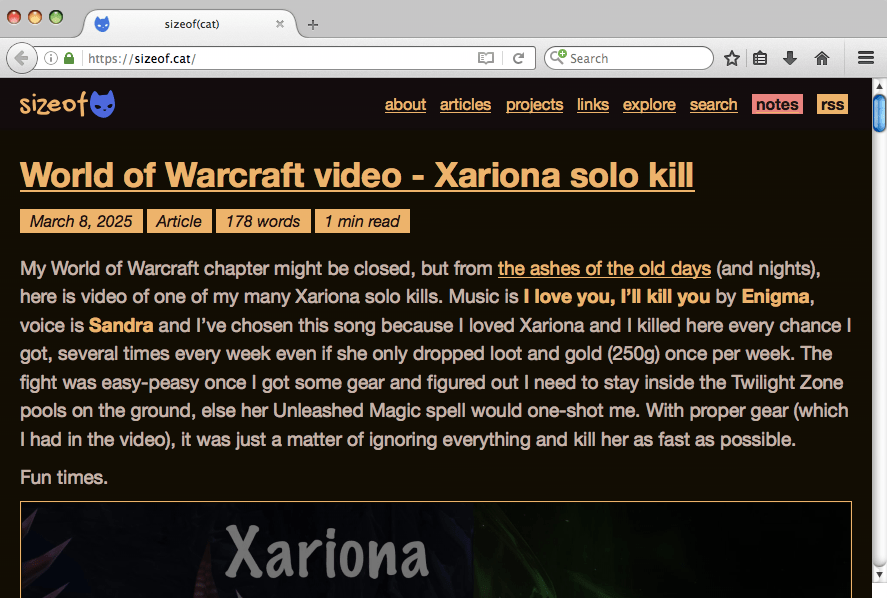
default look without any installed extensions
 |  | |
after installing Classic Theme Restorer and uBlock Origin extensions
 |  |
Building Fukurou
work in progress
License
Fukurou is released under Mozilla Public License v2.0.


