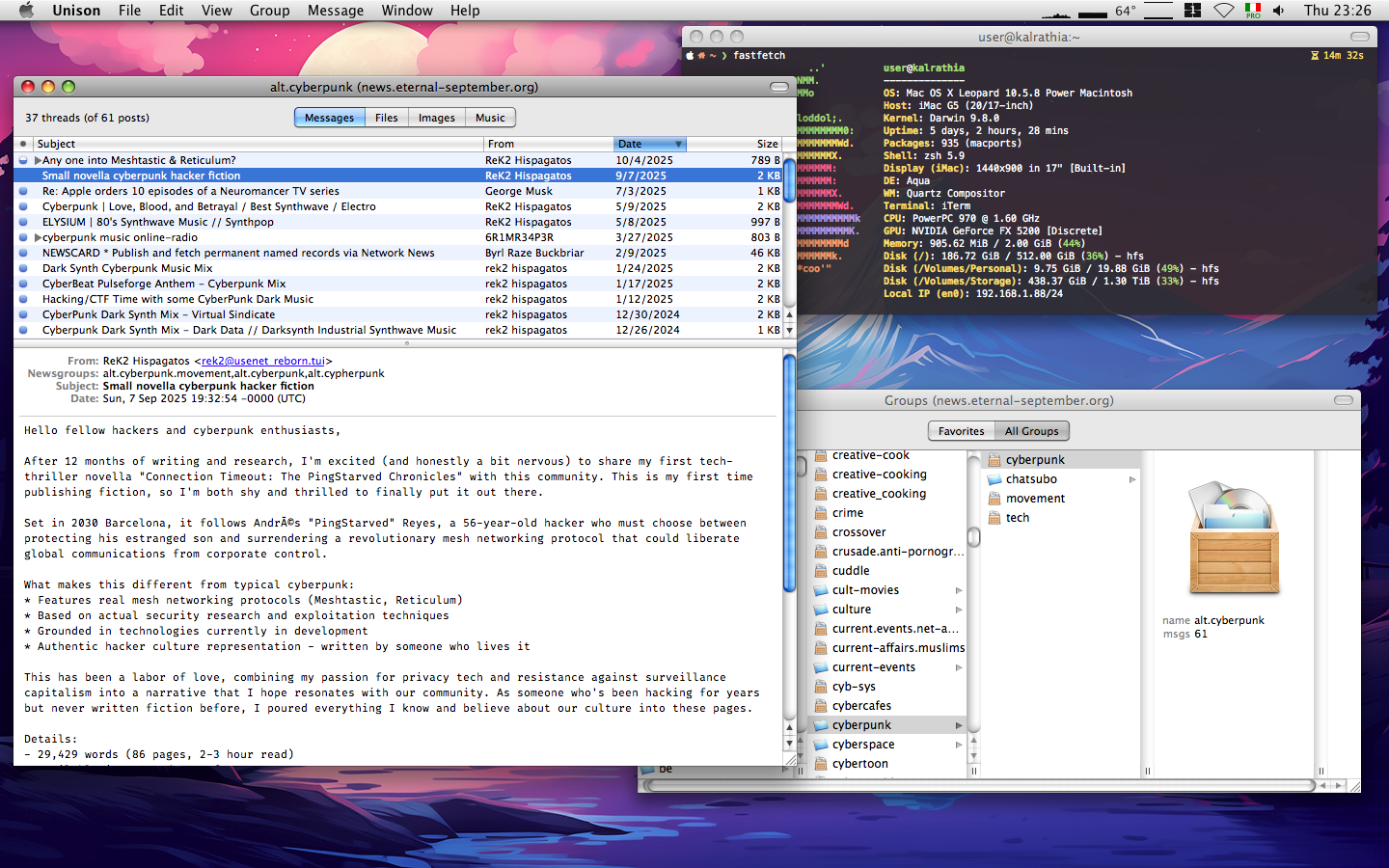
Usenet on OS X in 2025

Short article because it’s pretty easy to get on the Usenet using OS X (Leopard, maybe even Tiger), regardless of current year: basically you need a subscription to a News account, a computer running OS X (doh) and a Usenet client.
The subscription part can be solved for free using the services provided by Eternal September: register for an account on their website, make a note of the username you choose and the password you receive in e-mail and you’re good to go.
Next you’ll need a computer running OS X, preferable PowerPC because why not, bonus chic points for PowerBooks or iBooks.
And the Usenet part is pretty easy too, depending on whether you like GUI or TUI applications, you can either go with Emacs or Pan, or a GUI application like Panic’s Unison. Beware of versions 2.0+, you cannot register them easily because they require a connection to Panic’s servers for that, but 1.8.1 is perfect for reading news from the comfort of OS X. Register it using 0001-0589-3106-0032 and you’re done.
The configuration for Eternal September’s New server is this:
Server name: news.eternal-september.org
Port : 119 (NNTP)
Port : 563 (encrypted connection NNTPS)
And since the TLS stack in OS X is so old you can only use the 119 port (no NNTPS). Add your username and password in the mix, make sure you configure Unison, add your signature, and have fun browsing Usenet like it’s 1995. Or something.