Symbian development in 2024

During the last OCC (Old Computer Challenge, 2024) I planned to write a Symbian application for my phone, but in the end it turned out that one week is not enough to do everything I had planned; I did research a bit on what I need to develop apps for a Symbian Belle-powered Nokia 808 PureView smartphone.
Unlike Blackberry OS applications, that needed to be signed by Blackberry so it’s impossible to sign new apps since the Blackberry infrastructure has been taken down, Symbian applications can be self-signed so you can write new applications if you want to.
There are two ways you can develop apps for Symbian in the current year (2024): one is by using Qt and Qt Creator, and the other one is by using Nokia’s Carbide++ IDE and Nokia’s Symbian Belle SDK. In this article I’ll talk about the first way, which is Qt; also, the machine is running Windows 10, if you have a different OS you will need to download a different version of Qt. Start here.
Also, someone has been working on porting the newest GCC (14.2.0), so it’s worth checking that out too.
Qt
Start by downloading and installing the offline Qt SDK version 1.2.1 with Symbian Anna SDK.
Download the Symbian Belle Qt SDK, extract the archive and move the SymbianSR1Qt474 directory inside the Symbian\SDKs directory where you installed the Qt SDK. By default it should be C:\QtSDK\Symbian\SDKs\SymbianSR1Qt474\ and inside the Symbian\SDKs directory you will notice there is another directory named Symbian3Qt474, that’s the Symbian Anna SDK.
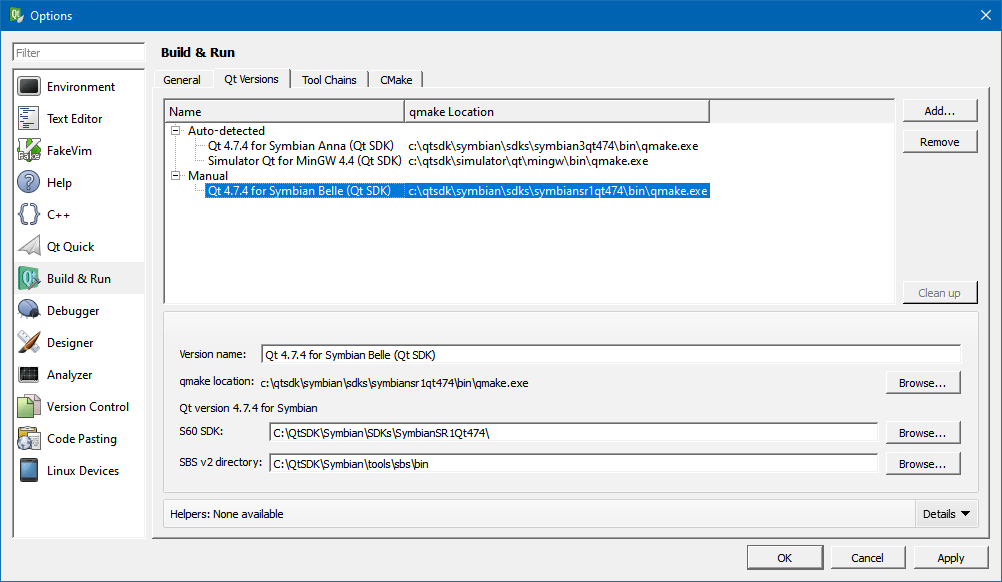
Open Qt Creator, from the main menu select Tools -> Options, in the new window select Build & Run from the left menu and choose the QT Versions tab in the right side of the window. Click Add… and select the path to the SymbianSR1Qt474\bin\qmake.exe binary and Qt Creator will figure out the rest correctly. Click the OK button when done.
GCCE
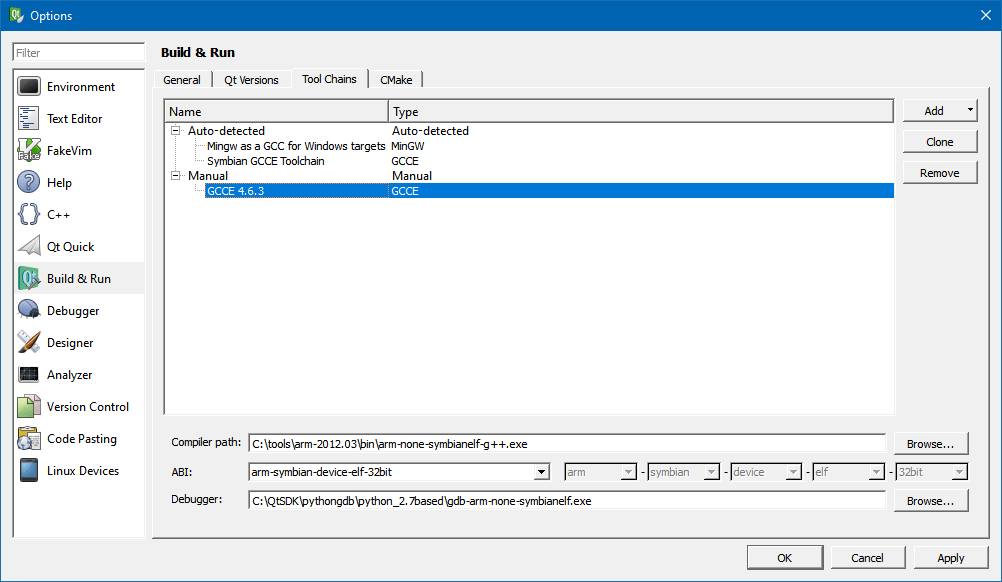
Qt 1.2.1 comes with gcce version 4.4.1, so you might want a newer version. Download gcce 4.6.3, extract the archive somewhere on your PC (in the image below I extracted it to C:\tools\arm-2012.03).
Open C:\qtsdk\Symbian\tools\sbs\lib\config\variants.xml file in your favorite text editor and add a new compiler entry. Basically copy paste the code below and add it after the <var name="gcce4_4_1" extends="gcce_base">...</var> section (around line 138).
<var name="gcce4_6_3" extends="gcce_base">
    <env name="SBS_GCCE463BIN" type="toolchainpath"/>
    <set name="GCCEBIN" value="$(SBS_GCCE463BIN)"/>
    <set name="GCCECC" value="$(GCCEBIN)/arm-none-symbianelf-g++$(DOTEXE)" type="tool" versioncommand="$(GCCECC) -dumpversion" versionresult="4.6.3"/>
    <set name="RUNTIME_LIBS_LIST" value="drtaeabi.dso dfpaeabi.dso"/>
    <set name="PLATMACROS.VAR" value="GCCE_4 GCCE_4_6"/>
    <set name="ARMMACROS.VAR" value="__GCCE_4__ __GCCE_4_6__"/>
    <set name="LINKER_GROUP_END_OPTION" value="-Wl,--end-group"/>
    <set name="LINKER_GROUP_START_OPTION" value="-Wl,--start-group"/>
    <set name="LINKER_DEFAULT_LIBS" value="-lsupc++ -lgcc -lgcc_eh"/>
</var>
Open Qt Creator, from the main menu select Tools -> Options, in the new window select Build & Run from the left menu and choose the Toolchains tab in the right side of the window. Click Add… and select the path to the newly extracted compiler arm-none-symbianelf-g++.exe and leave the other dropdowns as they are. Click the OK button when done.
That’s it, now you can start writing Symbian applications! Good luck.
Links
permalink http://sizeof.cat/post/symbian-development-in-2024/
created November 11, 2024
words 514
tags #symbian, #development, #mobile


