Old Computer Challenge - 2024 edition - thoughts
If you don’t know what the Old Computer Challenge is, or what was my setup for the OCC-2024, I suggest you read my intro article, I won’t repeat myself here. Instead, I’ll just leave you with some general thoughts and the notes written each day. Enjoy.
- My OCC setup was Nokia Booklet 3G netbook running Windows 7 Professional and Nokia 808 PureView as phone, running Symbian Belle Refresh. I didn’t touch any other devices (neither computers, nor phones), under any circumstances.
- Nokia Booklet 3G is a beautiful aluminium-slab machine, it’s too bad Nokia never did netbooks again.
- An Atom-powered netbook with 1Gb of RAM is enough to do 99% of the things I usually do on a M1 MacBook Pro with 8Gb RAM.
- People saying don’t use Windows 7 because it has no security and you will be hacked and transformed into Barrack Ossama bin Laden the ex-USA president, are children, and children should be scolded. And slapped.
- The Windows 7 install has been so tweaked that it resembles more Linux than Windows, but I love it; I was always a fan of Windows 7, Microsoft had something really good there, but the enshittification doesn’t forgive anyone. Same thing with Nokia and Symbian.
- uBlock Origin is what makes the Web usable. If uBlock is gone, the Web is gone.
- Pale Moon is an excellent browser, but you need to adapt your web browsing habits and stay away from the bloated websites.
- I disliked Gemini before, now I hate it. Gopher is the king.
- “I heard you like the old web, so here is a new protocol for the old web that will allow you to browse the old web just the way you like it. But it requires TLS, so you can’t use your old machines to browse the new old web via this new old web protocol I have made, just make a Virtual Machine on your 3k bucks MacBook Pro like a normal person and enjoy the old web from your new computer, bucko”. I have a word for this feeling, and it begins with retard. And ends with fuckheads. Actually, it’s not a word.
- Old software is small and light, new software is fat and bloated. I’m looking at you, Hugo, with your 120Mb executable file. You would think the biggest resource-consumer might be Visual Studio 2010 or maybe Word 2016, but you’d be wrong. Current-version Firefox, or Brave, or Hugo just obliterate the RAM and keep the CPU at 100% making the netbook unusable.
- Having more ports and more extensions on your machine is the difference between day and night. At some point, I had 8 peripherals inside Nokia Booklet’s USB ports and the world didn’t end (DVD writer, Floppy drive, RTL-SDR card, external HDD, wireless mouse receiver, external keyboard, external display power, smartphone sync cable) plus external display connected on the HDMI port and a soundbar on the audio jack. Just for the fun of it.
- The weakest link of my setup is Hugo and fact that it takes such a long time to build this website (with all its current 4k HTML pages it takes about 20 minutes after tweaks) on a lower-spec machine, and I need to figure out a solution for that.
- I watched movies, I listened to music, I wrote code, I played games, I read books, I browsed the web. What else is to say.
- What a beautiful phone is Nokia’s 808 PureView and it makes stupendous photos.
- Most used software on the netbook was HexChat (for IRC), Pale Moon (for web browsing), Lazarus (for development), Sublime Text (for opening anything), Telegram (for chatting), Winamp (for music), IDA Pro (for reverse-engineering) and QuiteRSS (for reading RSS).
- I played Diablo 2, Quake 2, StarCraft, Warcraft 3, Dune 2000, Imperialism 2, Sid Meier’s Alpha Centauri, Fallout Tactics, Homeworld and a bit of Neverwinter Nights.
- On the phone I played unhealthy amounts of Heebo (I might have finished the game 4 times but I will never admit it).
- What I missed: iA Writer, but I wrote more notes in a physical notebook, so it’s ok. I also missed playing Oxygen Not Included.
- What I didn’t miss: macOS Ventura.
- What I gained: I wrote two applications, managed to stay away from Social Media and its ilk, made some acquaintances, had huge amounts of fun.
- What I wish: People would take less time to pick obscure OSes and underpowered machines and not be able to do anything on them. Sure, you can use an Amiga or a VAX for the challenge, but … really? It’s not a challenge if you don’t do anything on the machine (except tinker in the terminal, which you can do on a 2024 Linux install anyway) and you post on day 1 “this is good”, on day 2 “crap” and nothing on the next days. Something tells me you’re not having fun and you made a bad choice. But it’s your choice, sure.
- There just wasn’t enought time for all the things I planned to do. Even if the OCC ends today officially, nothing stops me from alternating between the two laptops and try to fit the retrobook more into my life. The real challenge is the friends (and enemies) you make along the way.
Old Computer Challenge 2024 - Day 1
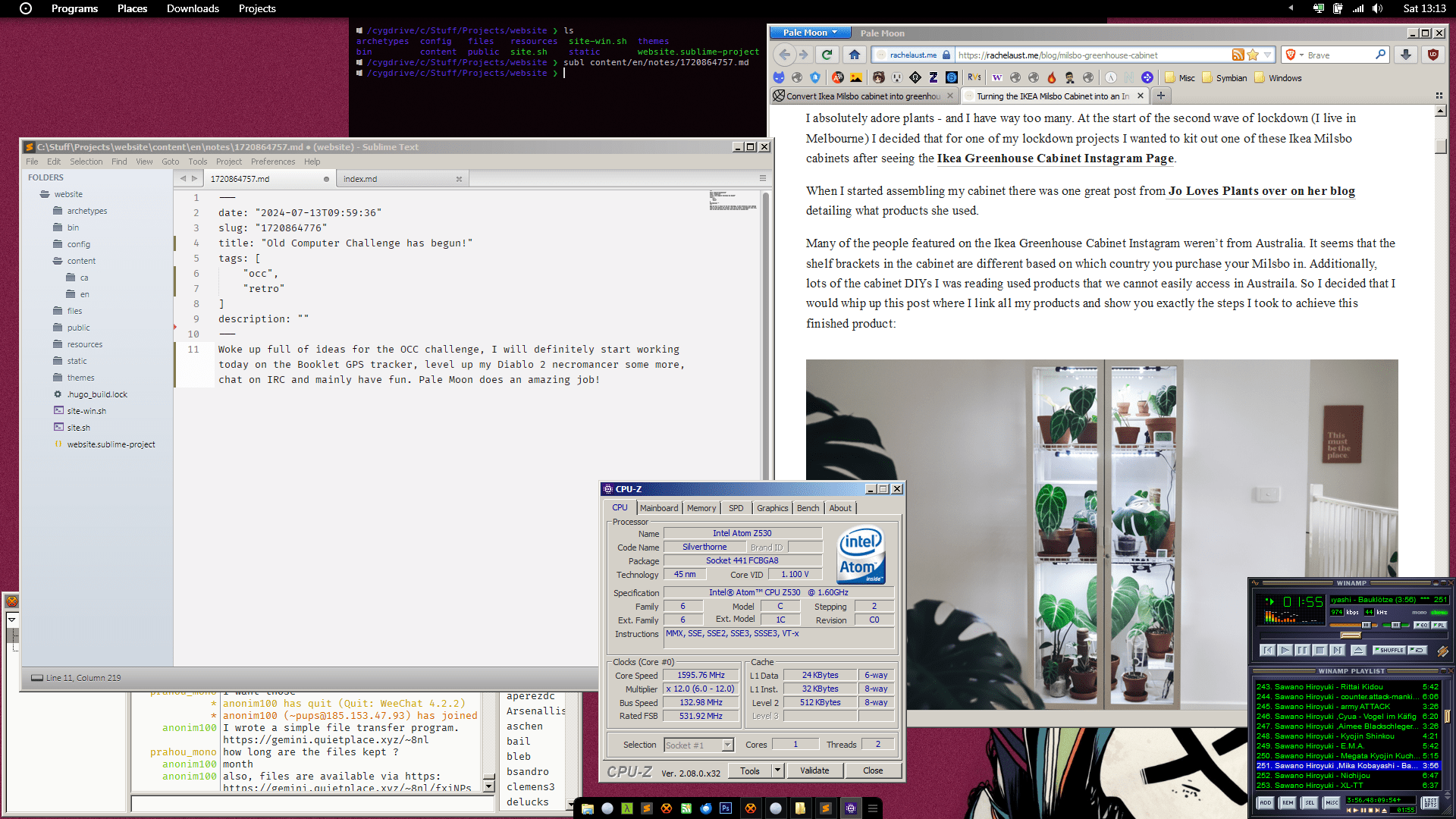
And we’re off! Woke up full of ideas for the Old Computer Challenge, I will definitely start working today on the Booklet GPS tracker, level up my Diablo 2 necromancer some more, chat on IRC and mainly have fun. Pale Moon does an amazing job, browsing modern (and bloated) websites is fun again. If I can find people to smash in Quake 2 q2dm1, I will do that too.
On the other hand, it’s not normal for humans to live in 45°C outdoors and 30°C indoor.
Old Computer Challenge 2024 - Day 2
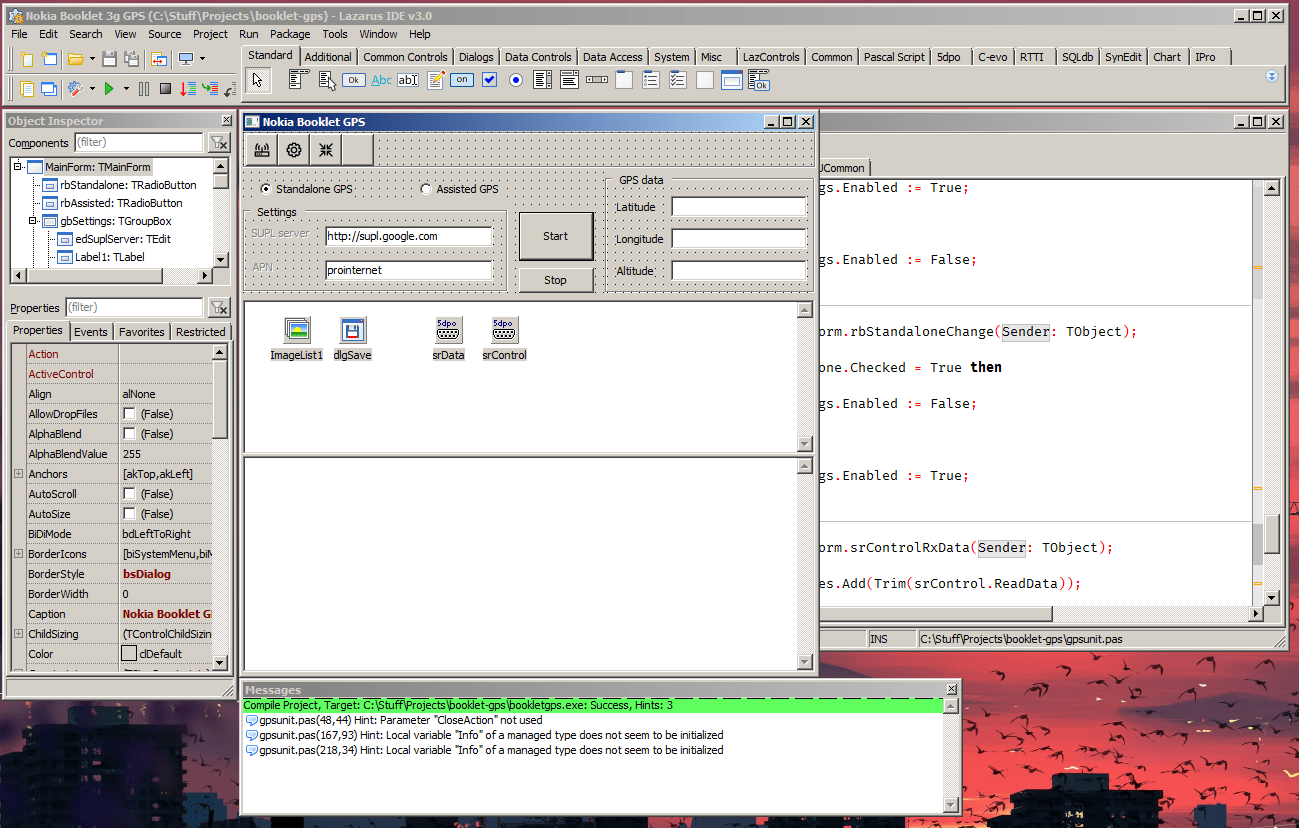
Today I managed to design most of the application in Lazarus and finished about 30% of the code behind, I can estimate it would take me about 7 hours of work to finish it, from the moment I created the project in Lazarus, to the very end. Good or bad, can’t say, I’m happy I still remember enough Visual Pascal, because it sure is badass.
On the gaming side, I’m still scared a bit of Nightmare Baal, so I’ll do some more Worldstone Keep runs to level up a bit (my Necromancer is level 66 now). Once I’m done with Baal I’ll move to the Hell difficulty and that’s where all the fun begins. I also got a Um rune, which is very rare, probably from the “Smash Mephisto’s Soulstone” quest.
I’m still writing on the website, even if it takes 30 minutes to do the Hugo build and deploy, thanks a lot Hugo (and Golang) developers. The Search function on the website should be disabled now, because there is no Windows 32bit binary for
pagefind, a tool which does the indexing for my website. I also disabled minification because the Windows binary for minify introduced some extra bugs.It’s amazing that stuff really works on the little Atom CPU, Hugo takes him at 100% for 30 minutes and I swear to Allah I saw the CPU crying in the corner all sweaty and stuff. But he does his job awesomely, for a such ultra-low-power CPU. The Nokia Booklet 3G netbook is one-helluva machine.
Still looking for people to smash in Quake 2, but fellow OCCers are busy doing sweet nothings in Plan9 or whatever toy OSes they are using (there, I said it, toy OS). Oh well, there is always the Quake 2 server browser.
IRC is ALWAYS fun!
Old Computer Challenge 2024 - Day 3
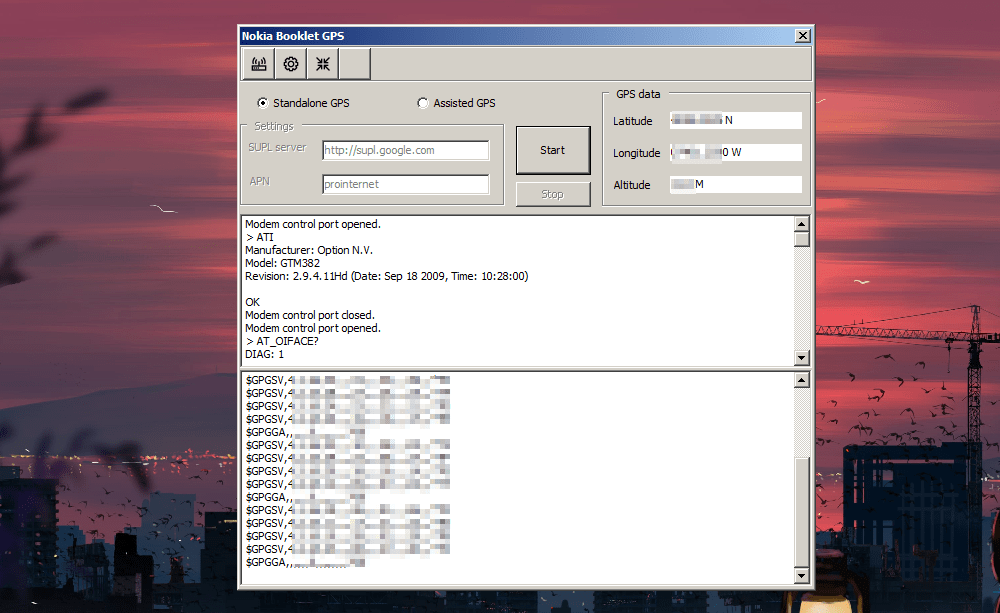
- The Nokia Booklet GPS tracker project is done! Was fun building it, I have some ideas of features I want to improve (actually, if I make a form to configure the control serial and the data serial ports, the application can be used with any netbook that has a modem incorporated) but overall I’m pretty happy with the result.
It uses GPS or AGPS to ping the GPS satellites for global positioning data and displays the result in the usual coordonates, latitude, longitude and altitude.
I managed to kill Baal on Nightmare first try (Diablo 2), so now I’m starting on Hell (and that’s even better, with better loot and more magic-immune bosses). Still level 66 but I got some nice plate chestpiece; the inventory space is noexistent and I’m only stocking up on gems and runes.
Watched some movies earlier, Media Player Classic (MPC-HC) does wonders, works even better than the latest VLC (had problems with some AVI files, not sure about the reason) and I have the latest K-Lite Codec Pack which works great with MPC-HC. Winamp for music, the same old 2.95 version, with a FLAC plugin.
Never mentioned the phone so far, when I started OCC I removed the SIM card from my old main phone and put it inside a Nokia 808 PureView smartphone, installed the Delight firmware (based on Symbian Belle Refresh) and a bunch of games (Heebo, 2048, Azkend2, The Settlers, Farm Frenzy 2, Dungeon Hunter 2) and Kutegram, which is a Telegram client that works great on Symbian. Besides that, I have Opera Mini installed because it proxies the web pages and that is required because Symbian at this version does not speak TLS 1.3. I don’t use email clients on my phone because I don’t want to. So I have games, browsing, music, radio and basic phone features. I sync the Nokia 808 phone with Nokia Suite on my Booklet and everything works as expected.
For people fearmongering security and Windows 7, all is good. I don’t download and install executables from the Internet, I have an application-level firewall installed on Windows 7, I have a VPN killswitch enabled in case OpenVPN fucks somehow, all incoming traffic is blocked and I’m behind NAT. If I need to install something (didn’t had to, so far), I use VirusTotal to scan the executable(s); anything suspicious gets deleted. And I’m still alive, not hacked, not compromised, not killed, no Russian or North Korean spies inside my network, my system doesn’t have
JoeBidenForPresident69.exeprocesses in the Task Manager.
It just works. And it’s fun!
Old Computer Challenge 2024 - Day 4
- Today is fun day, no work, just writing on the website, IRCing, web browsing (and gopher browsing), gaming (Dune 2000, Diablo and Quake 2), listening to Everything But The Girl’s new Fuse album and maybe some movies later. It’s so hot in here that Megan Fox called asking for tips.
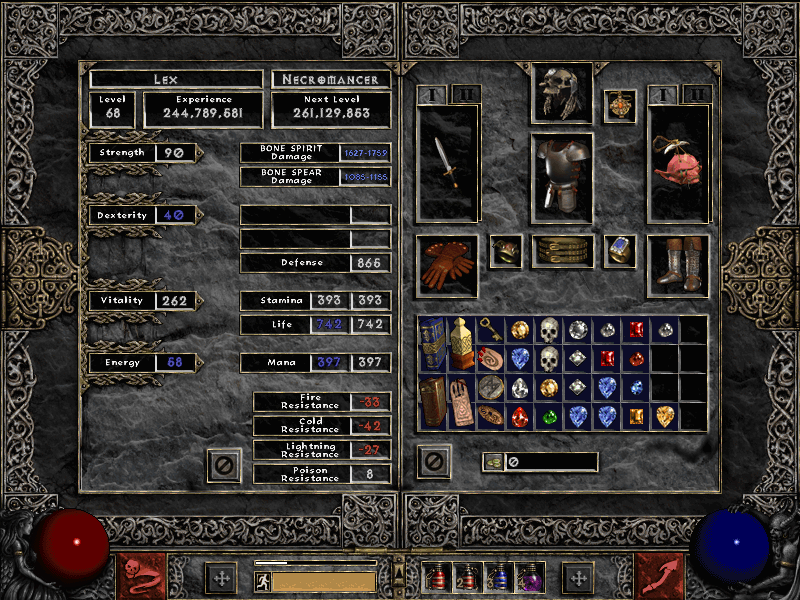
- Diablo 2 on Hell difficulty is definitely … hell, I think I need to up my resistances a bit; also, my inventory space is crying. I still plan on reaching max level in singleplayer mode on this Necromancer.
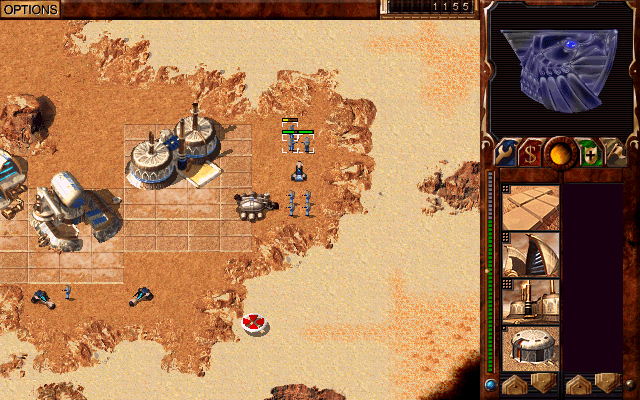
- I wanted to install and play Dune 2000 on Windows 7 a while ago, but the installer will not work under that version of Windows. So, I needed a workaround, because Dune is my favorite universe and I wanted to replay the game.
Get the Dune 2000 iso from the Internet Archive, mount the iso, use Universal Extractor 2 to extract the SETUP\SETUP.Z file to somewhere on your disk. Move the DUNE folder inside to C:\Games\ for example. Edit RESOURCE.CFG and change the data lines pointing to movies, music and missions to the optical drive path, for ex D:\MOVIES. Install the official 1.06 patch (extract it to C:\Games\DUNE\ for example), done. If you want to play in windowed mode, use DXwnd.
- On the “hacking” side, I managed to nop the 1Password license checks and so far everything seems ok. I’m using an ancient 1Password version (for Windows 7, offline only), and it’s ok because I’m not a pirate but a corsair.
Old Computer Challenge 2024 - Day 5
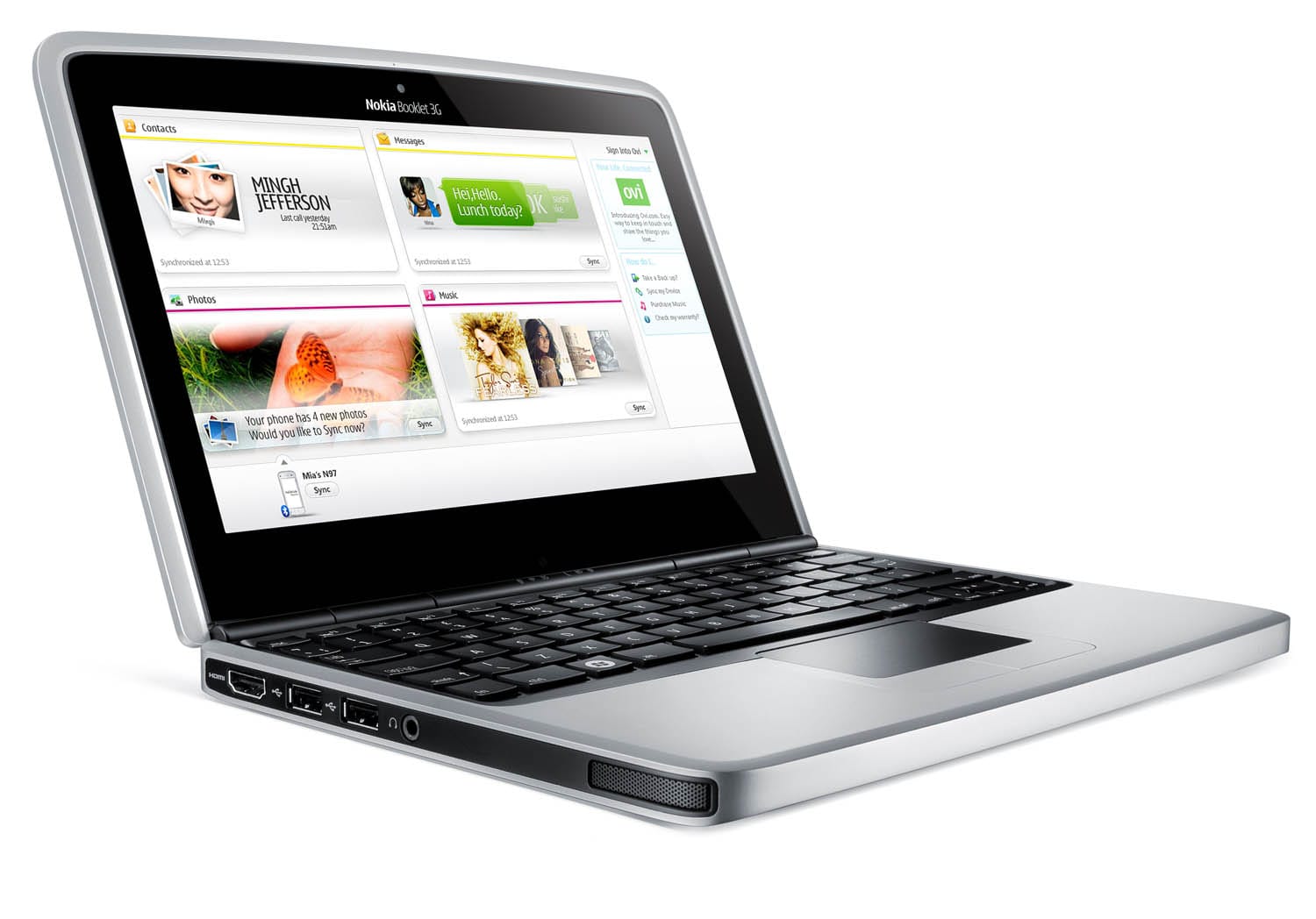
It’s so hot in here I swear I saw a polar bear wearing sunscreen.
- On Pale Moon I am using both Yandex Search and Brave Search, to install the Brave Search OpenSearch plugin in Pale Moon (it’s not available in the list of search plugins) you can click the button below (only works in Pale Moon, the
AddSearchProvider()function is deprecated in modern Firefox in favor of OpenSearch autodiscovery).
Or, if you’re afraid I will hack your computer and take all the nudes, copy and run this line in the Pale Moon console (I got the URL to the OpenSearch plugin from the source of the page search.brave.com, which means I’m basically a BlackHat now):
window.external.AddSearchProvider('https://cdn.search.brave.com/serp/v2/_app/immutable/assets/opensearch.BqerUIGT.xml');
I packaged the binary and source for the Nokia Booklet 3G GPS tracker and now the tool has a small project page.
MobaXterm is Cygwin on steroids, I might replace my Cmder + Cygwin setup with just MobaXterm. I also downloaded the whole mirror of Cygwin for my netbook’s architecture and it’s a whopping 15GB but the external HDD is still going strong. It’s good to be able to install all the packages offline, though.
I tried to find out a GUI client for Gemini, one that works on Windows 7 32bit, but that’s impossible. Lagrange, Kristall or GemiNaut are 64bit only, because it makes sense to only work on modern platforms. Therefore, I’m done with Gemini, the TLS requirement was already a massive turn-off, but not being able to find a client it’s kinda stupid. Sure, I can use TUI clients, but what’s the fun in that? Gopher all the way, sometimes old is better.
I might work on a 4chan application that works on Windows 7 and doesn’t require Electron or similar stuff, and remove all the images (basically turn an imageboard into a textboard). Filters might be a requirement because of all the junk that usually gets posted on 4chan. We’ll see.
The thermal pads I ordered for the Booklet, are here, so today I will remove the keyboard and replace the old ones (CPU, Poulsbo chipset, RAM chips and HDMI encoder). Someday I should find a newer battery, the current capacity of this one is 35% less. I have another main board which has a non-functional HDMI encoder chip, when I plug an external display via HDMI, the system (Windows 7) just hangs. It’s not a matter of having different drivers, I noticed the other board didn’t have a thermal pad on the HDMI chip, so I guess it overheated and now is malfunctioning.
I wanted to see if I can compile Tekk’s teeny tiny gopher server (ttgs) (gopher-only link) under Cygwin on Windows 7, and guess what: IT WORKS!
Download ttgs-1.3.tar.gz, extract it, open config.h and change #define GOPHER_PORT "70" to #define GOPHER_PORT "7070". Open ttgs.c and comment lines 106-108 (I wasn’t able to make the user syncronization between Windows and Cygwin work, even with creating a normal user called gopher via Windows’ Control Panel and syncing Cygwin’s database with mkpasswd -l > /etc/passwd && mkgroup -l > /etc/group, but I’m 99.99% sure it was something I did wrong). Keep in mind that by disabling the code which makes ttgs run as the gopher user, it will probably run either as your user, administrator or Steve Ballmer, so make sure you’re not serving porn or top secret documents via gopher. You will also need to create the /var/gopher directory too and put a .map file inside (which is just text). I just love simplicity.
$ tar -xzvf ttgs-1.3.tar.gz
$ cd ttgs-1.3
$ make
$ mkdir /var/gopher
$ ./ttgs
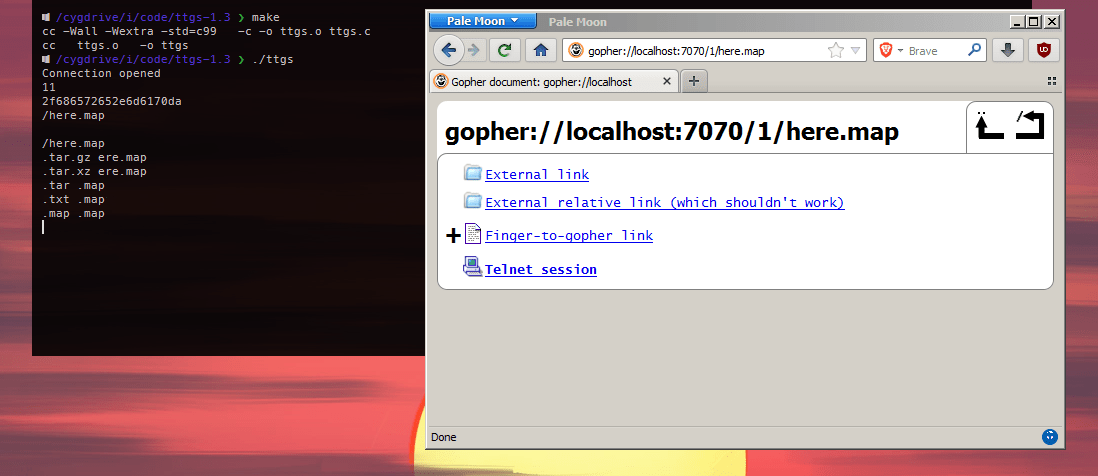
I really love my current setup and this little netbook, I’m not looking forward to my MacBook Pro and the shithole that is macOS Ventura.
Old Computer Challenge 2024 - Day 6

- You can’t say Nokia 808 PureView isn’t making excellent photos, download the full resolution image here (14Mb image, 6453x4354). Nokia Suite is working very well for syncronization between the 808 smartphone and Booklet netbook, you can even use the smartphone to connect the netbook to the Internet via Bluetooth or USB (not like Nokia’s Booklet doesn’t have an integrated modem, but still, alternatives are always good).
- Today I replaced Booklet’s CPU, chipset, RAM and HDMI encoder thermal pads, it was supposed to be a job for yesterday, but I had stuff to do. I added some extra pads between the aluminium chassis and the SSD, so the heat will dissipate even better (it came with a HDD so it didn’t need thermal pads before). HWmonitor is reporting a min temperature of 53°C and 80°C max with a baseline of 61°C, which is not bad, it’s about 5°C less than before.
- Since I replaced the thermal pads, a silly idea started crawling into the back of my brain: what if I overclock the Atom Z530 CPU from 1.6GHz to 1.8GHz? Basically you up the FSB from 133.3 which is default, to 150.1MHz and pray. Raising the FSB clock speed also raises the DDR speed from 266.7 to 300.3MHz and PCI-E speed from 100 to 112.6MHz, so there might be some system instability, but for now it’s going well. The temperature of the CPU went up by 5°C to a baseline of 66°C.
- Benchmarking the CPU using CPU-Z’s built-in benchmark tool renders a 16.7 Single Thread and 34.4 Multi Thread score for the normal FSB (at 1.6GHz), while the overclocked version (at 1.8GHz) had a 18.9 Single Thread and 38 Multi Thread score, which is a 10-13% score increase, so make of that what you will. As a comparison, a Intel Core i9-14900KS CPU does 957 Single Threaded and 9058 Multi Threaded (a silly comparison because the I9-14900KS CPU has a huge number of cores and costs almost as much as 1000 Atoms).
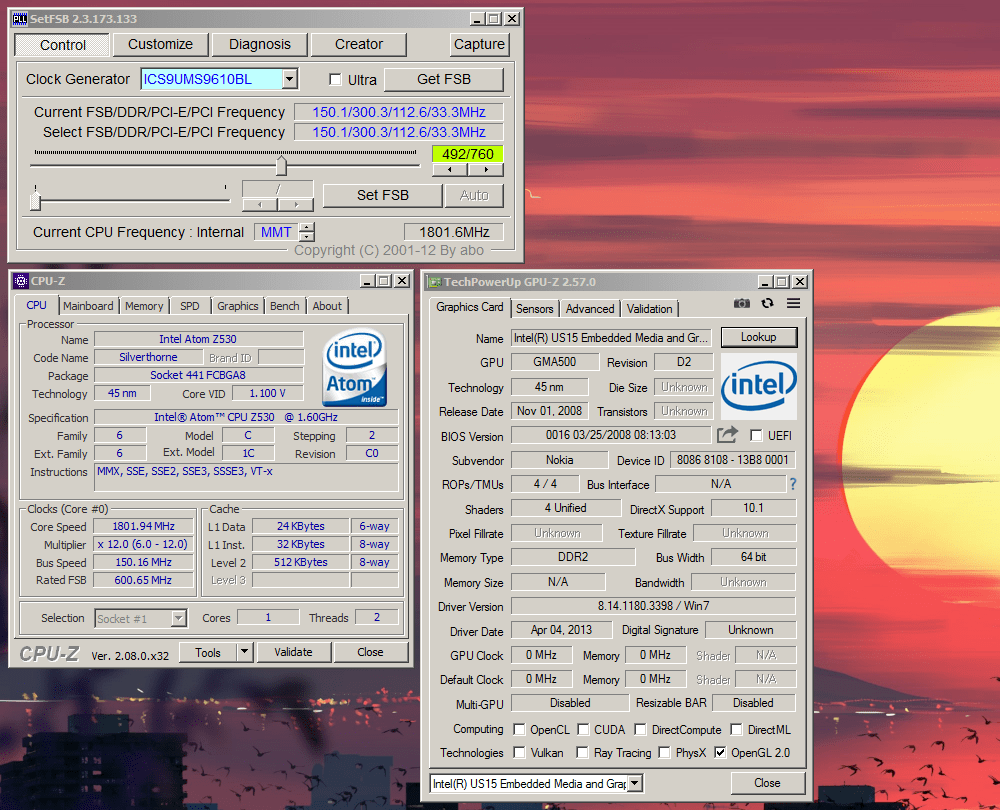
A better comparison would be with an Intel n450 CPU clocked at 1.66GHz, and a friend (gemini-only link) from the OCC IRC benchmarked that, with a score of 32.6 Single Thread and 62.5 Multi Thread.
- I started using an external portable 1920x1080 external display connected via HDMI (and charged via one of netbook’s USB-A ports) and it’s way better than the built in 1280x720 display because you can get way more information at a single glance. Obviously.
- Diablo 2 on Hell difficulty is really hard, the problem is the mercenary dies in seconds at the first miniboss he encounters, and a 30k resurrection fee makes any deaths costly. My Necromancer is level 70 now.
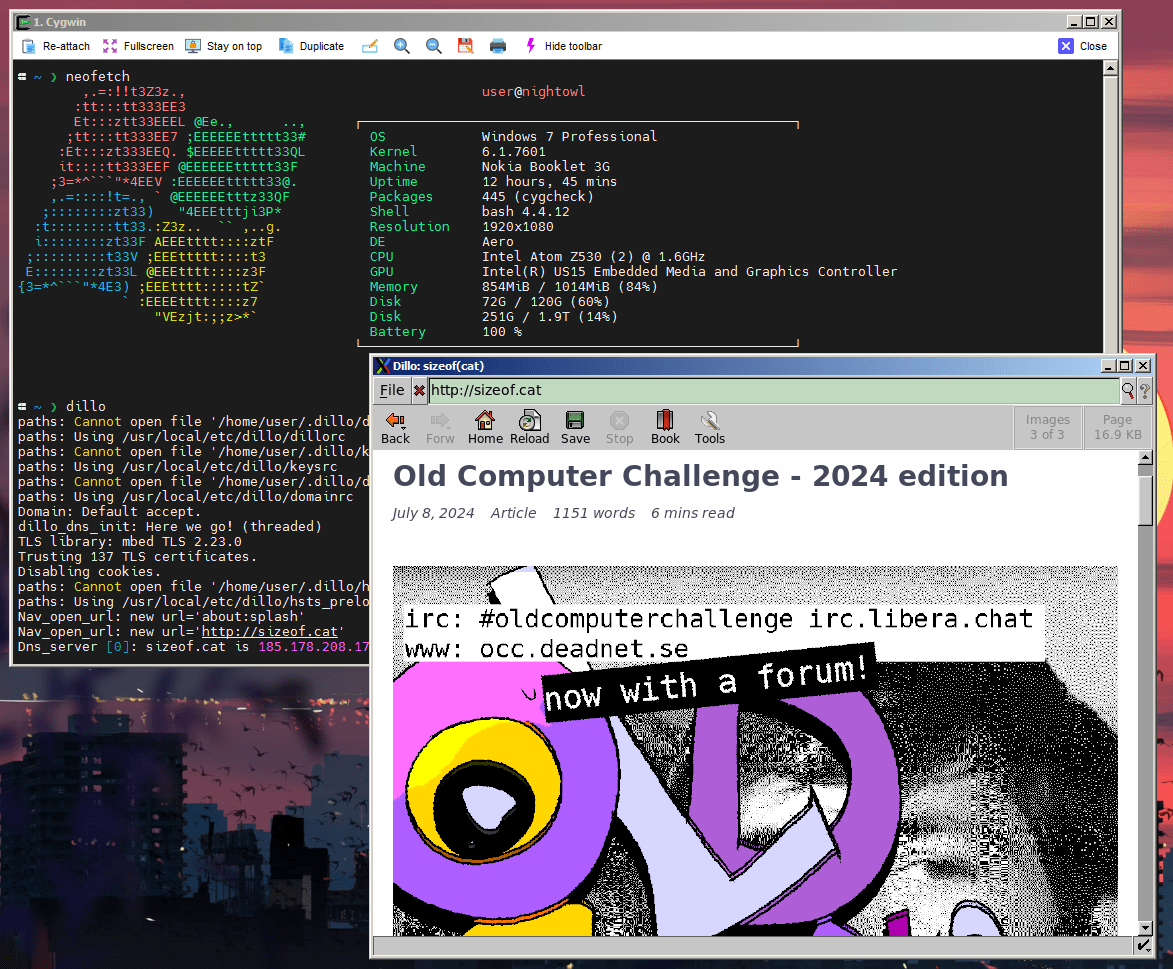
- I managed to compile Dillo with SSL support via mbedTLS and it launches correctly on Windows 7 using MobaXterm’s integrated X server, and this means this machine is a Frankenstein Lindows or … Winux.
Old Computer Challenge 2024 - Day 7
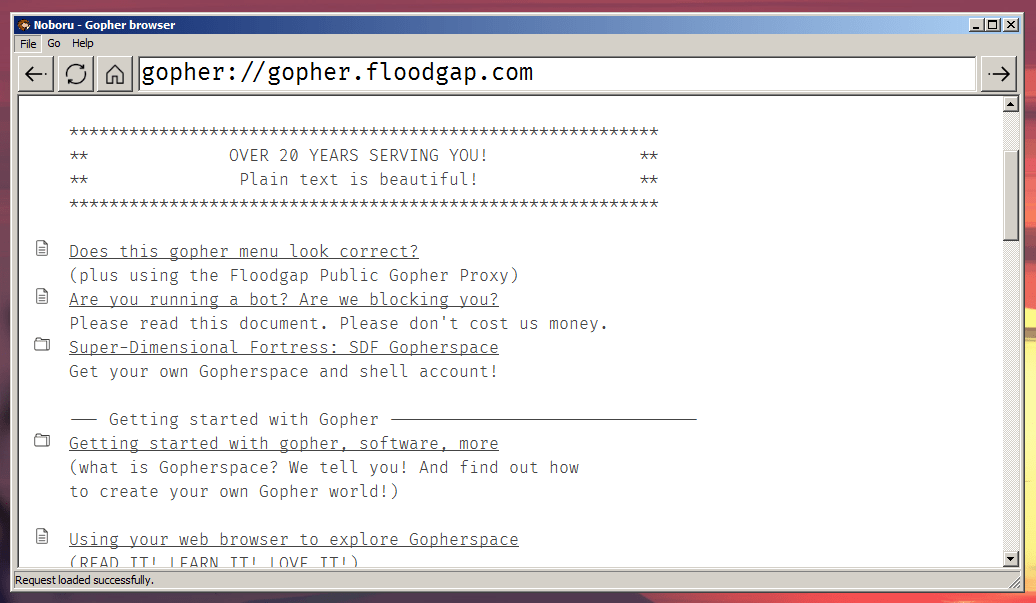
- Today was a very busy day so I had less time to play with my OCC setup, but I did write a ultra-small Gopher browser for Windows 7 (not like it was something mega complicated anyway). It lacks image display for now, maybe a next feature, but you can browser gopherholes with it, download files, etc. As usually, written in Visual Pascal under Lazarus IDE. Tomorrow I’ll compile the Release binary and add a new project page to the website, where you can download both the executable and the source code.
- The Booklet is still running with the overclocked Atom and everything looks fine. If you don’t want to mess with setFSB’s settings each time you want to switch between normal and overclocked FSB, you can make two shortcuts to
setfsb.exe, one by changing the target to"setfsb.exe -w5 -s 134 -cg[ICS9UMS9610BL] -q"(this is for the normal FSB, 1.6GHz), and one with the target set to"setfsb.exe -w5 -s 151 -cg[ICS9UMS9610BL] -q"(this is for the overclocked FSB, 1.80GHz). You can even place the overclock shortcut inside the StartUp menu if you want your system to boot overclocked into Windows.
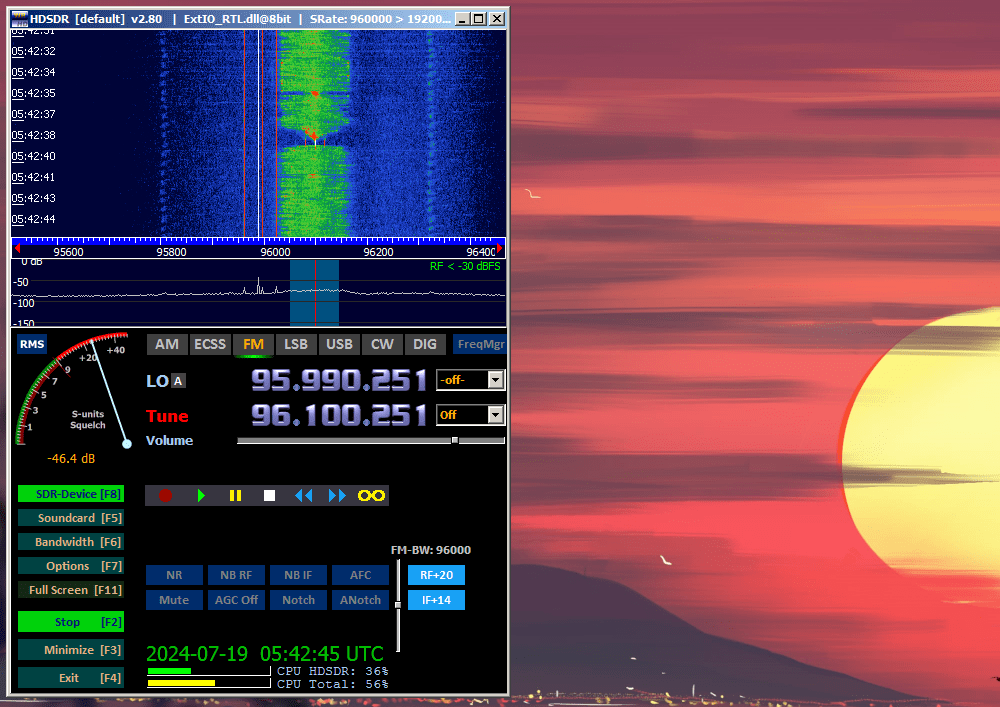
- Since I was away from home for a while, I took my Booklet outside, plugged in the RTL-SDR adapter and its antenna, and went for some airwave-snooping. I still need a bigger antenna, but one that does look inconspicuous.
- Is it racism if you want local stores not to have shampoo bottles behind a level 3 forcefield?
See you next year for the Old Computer Challenge - 2025 edition, if the world doesn’t end.
permalink http://sizeof.cat/post/old-computer-challenge-2024-thoughts/
created July 20, 2024
words 3388
tags #personal, #website, #windows 7, #nokia, #occ