Huawei E3131 and friends, on macOS Catalina (x64)
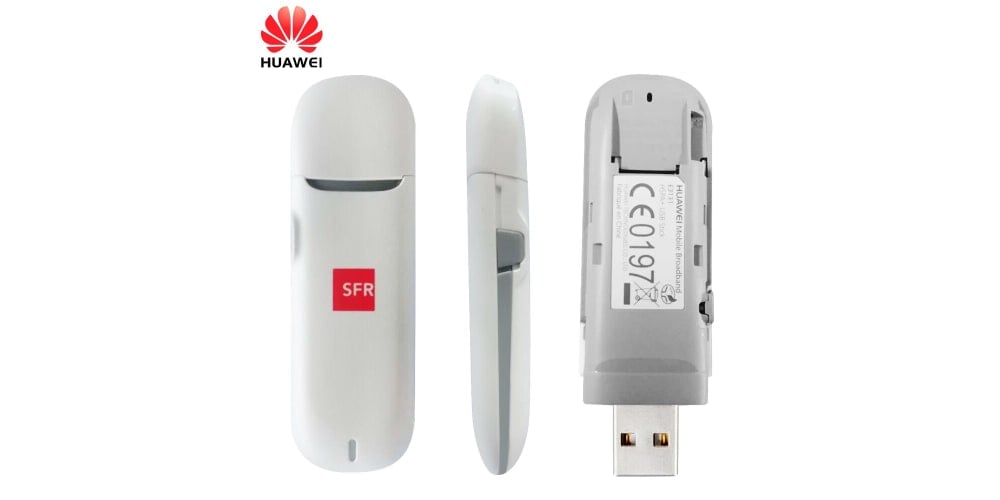
If you have an older Huawei E3131 3G USB stick and you want to use it, and you run macOS Catalina, you’re in for a wild ride. All the drivers you can find online will not work, and good luck trying to find anything on Huawei’s website.
The only working version of the Huawei E3131 modem driver I could find for macOS 10.15 “Catalina” (and I searched for weeks) is this one. All the drivers seem to be for older versions of macOS (32bit ones, how I wish I could find a working PowerPC driver) and for obvious reasons they won’t work on Catalina.
After installing the driver you don’t even need the bloated “Mobile Partner” software (if you find one that works) from Huawei and friends (ISPs usually re-brand the software using their own logos, colors and unneeded features), you can just pop in a SIM card, switch the device from disk mode to modem mode, plug the USB modem in and go to macOS’ “System Preferences” -> “Network”. A new device will be there, called “HUAWEI Mobile” or something similar, and you can use the *99# Telephone Number to dial using the modem.
You can use screen or minicom to query the modem for capabilities, information, and to switch it from disk mode into modem mode (something a Linux-distro would normally do using the usb-modeswitch package).
$ ls /dev/tty.HUAWEIMobile*
/dev/tty.HUAWEIMobile-Pcui
$ screen /dev/tty.HUAWEIMobile-Pcui
AT^SETPORT="A1;10,12,16"
OK
Now if you exit screen and re-plug your modem, you’ll notice an obvious change:
ls /dev/tty.HUAWEIMobile*
/dev/tty.HUAWEIMobile-Modem /dev/tty.HUAWEIMobile-Pcui
The USB modem is operational now, and you can dial *99# to establish a connection.

Getting version info using screen or minicom:
AT^VERSION?
^VERSION:BDT:Apr 10 2014, 14:10:47
^VERSION:EXTS:21.318.25.00.623
^VERSION:INTS:
^VERSION:EXTD:UTPS23.015.05.00.623_MAC23.015.05.00.623_LNX23.015.05.00.623
^VERSION:INTD:
^VERSION:EXTH:CH1E3531SM
^VERSION:INTH:
^VERSION:EXTU:E3131
^VERSION:INTU:
^VERSION:CFG:1004
^VERSION:PRL:
^VERSION:INI:

OK
Getting modem capabilities info:
ATI
Manufacturer: huawei
Model: E3131
Revision: 21.318.25.00.623
IMEI: <REDACTED>
+GCAP: +CGSM,+DS,+ES

OK
Switch the device into modem mode:
AT^SETPORT="A1;10,12,16"
OK
Check the device mode:
AT^SETPORT?
^SETPORT:A1;10,12,16

OK
List all the device modes:
AT^SETPORT=?
^SETPORT:1: MODEM
^SETPORT:2: PCUI
^SETPORT:3: DIAG
^SETPORT:10: 4G MODEM
^SETPORT:12: 4G PCUI
^SETPORT:6: GPS CONTROL
^SETPORT:13: 4G DIAG
^SETPORT:5: GPS
^SETPORT:A: BLUE TOOTH
^SETPORT:16: NCM
^SETPORT:A2: SD
^SETPORT:A1: CDROM

OK
As you can see, this modem has GPS capabilities, but in order to access the GPS data we need to add the GPS mode to the device (both GPS and GPS CONTROL flags), though I haven’t found a way to issue AT_OGPS commands and retrieve GSM data:
AT^SETPORT="A1;10,12,16,5,6"
OK
Be extra careful never to remove the PCUI (2) or 4G PCUI (12) flags from the device modes, else you won’t be able to connect to the modem via serial, anymore.
Check the dialing configuration:
AT+CGDCONT?
+CGDCONT: 1,"IP","net","",0,0,0,0

OK
And you can also dial using ATDT *99#.
To send a SMS, switch into text mode first (press CTRL+ Z after you finished writing the message, to send it):
AT+CMGF=1
+CMGF: 1

OK
AT+CMGS="+97121234567"
> hello
+CMGS: 85

OK
To read your SMS messages, switch into text mode first (use all for all messages, rec read for read messages, rec unread for unread messages:
AT+CMGF=1
+CMGF: 1

OK
AT+CMGL="all",
+CMGL: 0,"REC UNREAD","+97121234567",,"25/10/01,10:42:50+12"
hello

OK
To read a specific SMS message, find its ID from the previous command (+CMGL: 0 line, 0 is the ID here) first:
AT+CMGR=0
+CMGR: "REC READ","+97121234567",,"25/10/01,10:42:50+12"
hello

OK
Get various information about the modem:
AT+GMI
huawei

OK
AT+GMM
E3131

OK
AT+GSN
<REDACTED>

OK
If you want to use the 3G modem on macOS Catalina only, and you need just the modem functions (no SD, GPS, CD), set the device modem to minimal (10 is modem, 12 is control interface port):
AT^SETPORT="FF;10,12"
OK
AT codes are fun, aren’t they?


