Hoshi System Bar
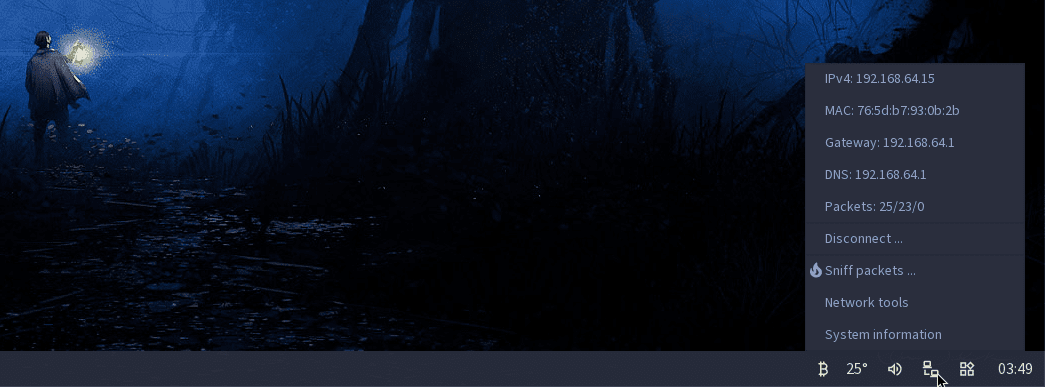
I forgot that someone e-mailed me a while ago asking me what are the icons on the right side of Hoshi’s taskbar (it’s actually the System Bar) and if I want to “reveal” some information about them, so here is a small walkthrough.
The first applet retrieves the Bitcoin Price Index JSON from Coindesk and displays it on right click. It’s the first applet I did for Hoshi and it prompted the creation of the JSON-parsing library in libhoshi, so I’m pretty attached to it, even if it’s useless to me.
The second applet retrieves weather data from api.openweathermap.org via a similar JSON file and shows the current temperature in the System Bar and some more weather info on right click. The city, API key, unit format are all configurable from a small popup window (and a config file). This applet is obsoleted by the Weather Widget that resides inside the Widgets Bar, I’m keeping it enabled for now so the System Bar looks more active.
The third applet is the volume mixer and since the audio subsystem in the kernel is not yet completed, it’s more of “just an icon”.
The fourth icon is the network status applet, displays the network status in the System Bar so it’s visible at a quick glance if Hoshi is connected to the network or not, and has some additional information on right click (network data is provided by QEMU’s network emulation layer).
The fifth icon toggles the Widgets Bar on the right side of the desktop.
Last is the system time, obviously.
The Bitcoin Price and Weather Status applets can be disabled from the System Bar’s configuration file:
; Weather applet configuration
[weather]
city=Valletta
units=metric
key=<REDACTED>
autorefresh=3600

; Bitcoin applet configuration
[bitcoin]
autorefresh=3600

; List of applets and their status
[applets]
weather=1
bitcoin=1
The Widget Bar has a similar configuration file for its widgets:
; Memory pressure widget configuration
[memory]
autorefresh=10

; Weather widget configuration
[weather]
autorefresh=3600
city=Valletta
units=metric
key=<REDACTED>

; List of widgets and their status
[widgets]
calendar=1
memory=1
weather=1
The Widget Bar and System Bar are separate applications and they both get launched by the init process, but I guess the end goal is to have a setting inside the System Bar’s config file and if the Widget Bar is enabled there then the System Bar should fork the Widget Bar (and toggle the applet icon), and the init process should launch just the System Bar by default.
Someday.
*before you say I just exposed my location, think again
A series is usually a collection of multiple website posts about the same subject and dependent of each others. This article is from the Hoshi operating system series:
- Hoshi development setup
- Hoshi System Bar


